

VPN is a Virtual Private Network. It is one of the trending topics in the IT industry. You might have heard about it from your office colleagues, from your roommates, or maybe on the internet for the first time.
Or do you want to access blocked websites on college WiFi?
At the end of the post, I will share with you a quick two-minute setup with which you can access any website.
Hold on…
Let’s first learn how a VPN works.
In this post, we check out
Table of Contents
How VPN works actually in real-time?
Step-by-step.
For example, you want to access the website “www.pcskull.com” from your computer or Smartphone…
Consider the case where you are not using any VPN and not have activated to any of the third-party VPN services; then the packets (containing the website URL) will travel through the normal and defined route to the PCSkull servers. The server can get all the required information from your device as a legitimate/valid user and will send the response back to you.
How does a VPN work like a proxy?
Now, in the second case, you are using a third-party VPN service. Whenever you visit the website, first the packets will be sent to the systems of the VPN provider. VPN forwards our query to access the website on our behalf. The IP address that we have used in the packet gets changed to a VPN provider system address. After the packet reaches the destination server, it receives a proxy VPN server IP address. There is no way for the destination server to distinguish the proxy server IP (VPN IP) and user IP. It strongly believes the VPN is nothing but the user who wants to access data.
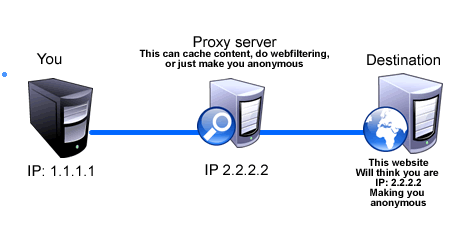
The PCSkull servers then will send respond back with the result to the VPN providing system. After receiving packets from the PCSkull server, the VPN forwards them to the user, and the user gets access to the PCSkull website.
Sometimes it is observed that using a VPN slows down Internet access. To get data from the actual server, we have to access a VPN system first, which adds an extra routing penalty. Apart from this, a VPN proxy server even stores caches on its system (that contain data to be used in the future) from the requested packet, performs web filtering, making the request to the actual server. In short VPN server work intermediate between the user and the destination server.
Read more: Battle between Tor and VPN network
Advantages of using a VPN server
Except for having extra routing payload, there are many advantages of using a VPN service that add value to use it. Here are two main advantages of using a VPN that everyone should know.
Security:
It is a main concern nowadays to secure data over the internet connection. If the connection is not secure, hackers can snatch data from the packets that may contain various credential information like login ID, password, credit card information, etc. If you are using a VPN, packets that are going to be sent to the VPN server from our devices are encrypted using the encryption algorithm provided by the VPN service. So a hacker can get the packet but can not read it, as it is encrypted.
Web sites blocked by the Campus WiFi?
We have seen that many websites are blocked by internet service providers or our Campus WiFi admin, especially if you are using college campus WiFi.
There is a firewall at every internet service provider that reads our packet data and filters out all the websites that are restricted and vulnerable to use.
Here, if you are using a VPN service, all the packet data gets encrypted before sending it to the internet. Packet going through the firewall, it can not read these encrypted packets. So there is no way for the campus WiFi admin to block your request to access any sites in the World, not even porn sites.
There are various VPN service providers.

After comparing some of the popular VPN services, I found Surfshark VPN is the best. It is more affordable for college students.
Now I know you are more eager to try this out. As all data is encrypted, even campus WiFi providers cannot hold any data regarding what you are accessing.
How to Access Blocked Websites on College WiFi?
There are many premium as well as free VPN service providers.
You can go with Surfshark VPN, which offers special discounts.
If you want to use a VPN service on your Desktop, there is a Chrome plugin that enables VPN service. Zenmate plugin is one of the recommended Free VPN service providers. I have been using it for many years, and it is pretty awesome.
Feel free to comment on your experiences using VPN and share them with your friends.
Common Misconceptions about VPN
The biggest misconception about VPN is that many believe our IP address gets changed.
But it is not true. They Don’t change the IP Address of the devices instead. VPN server uses its own systems with different IPs on behalf of our devices when querying the website you want to visit.
I hope, after reading this post, you are able to access blocked websites on college WiFi and also got to know how it works. In the next post, I will describe how VPN works on smartphones and how to use a VPN service on a smartphone.
Stay tuned!

Nice article!
Thanks Davesh 🙂